
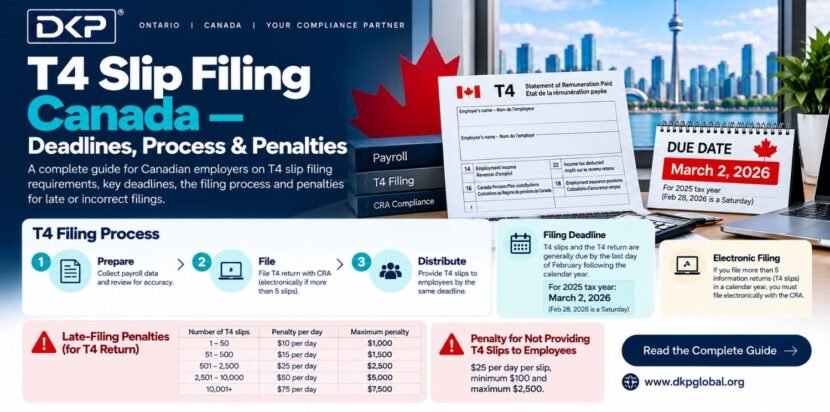
A T4 slip (Statement of Remuneration Paid) is the Canadian equivalent of a W-2 every employer must issue a T4 to each employee and file a T4 Summary with CRA by February 28 each year (February 29 in leap years). T4 slips report total employment income (Box 14), income tax deducted (Box 22), CPP contributions (Box 16), and EI premiums (Box 18). The penalty for late T4 filing is $10 per day up to $1,000 minimum, or $10–$75 per slip for late employee copies. DKP Global prepares and files T4 slips for all payroll clients.
In This Guide:
- 1. What is a T4 Slip? Who Must Issue One?
- 2. T4 Slip Boxes Explained — Every Box You Need to Fill
- 3. T4 Filing Deadline — February 28 and What Happens If You Miss It
- 4. T4 Summary — What It Is and How It Differs from the T4 Slip
- 5. How to File T4 Slips with CRA — Step by Step
- 6. T4 vs T4A vs T4E — Which Slip Do You Need?
- 7. T4 Filing for Small Businesses in BC & Ontario
- 8. Common T4 Filing Mistakes Canadian Employers Make
- 9. How DKP Global Handles T4 Filing for You
- 10. Frequently Asked Questions (10 Q&As)
1. What is a T4 Slip? Who Must Issue One?
A T4 slip formally called the Statement of Remuneration Paid is an annual tax document that every Canadian employer must issue to each employee. It reports the total employment income paid during the calendar year and all deductions withheld: income tax, CPP contributions, and EI premiums. Think of it as Canada’s equivalent of the W-2 in the United States or Form 16 in India.
The T4 serves two purposes: it gives the employee the information they need to file their personal income tax return (T1), and it gives CRA a record of what was paid and withheld allowing CRA to cross-check that payroll remittances throughout the year were correct.
Who Must Issue a T4?
You must prepare and file T4 slips if you are an employer who paid any of the following during the calendar year:
- Employment income salary, wages, bonuses, commissions, tips, gratuities
- Taxable benefits group insurance premiums, company car personal use, housing allowances
- Retiring allowances or severance pay
- Salary paid to a shareholder-employee even if you are the only employee of your own corporation
- Any amount from which income tax, CPP, or EI was deducted
You do NOT need to issue a T4 if you paid an independent contractor or self-employed person in that case, a T4A slip may be required instead (see Section 6). This distinction is important: misclassifying an employee as a contractor is a common and expensive CRA audit trigger.
Even if an employee earned less than $500 in the year, or if no income tax was withheld, you must still issue a T4 if CPP or EI was deducted. The only exception to T4 filing is if the employee died in the year and the estate was the only recipient in which case a T3 trust return may be involved instead.
2. T4 Slip Boxes Explained — Every Box You Need to Fill
A T4 slip has a series of numbered boxes, each representing a specific type of income or deduction. Here are the boxes every employer must understand:
| Box # | Label | What Goes Here | Notes |
| Box 14 | Employment income | Total gross employment income salary, wages, bonuses, commissions, taxable benefits | Most important box must match payroll records exactly |
| Box 16 | Employee’s CPP contributions | Total CPP deducted from employee pay for the year | Cannot exceed annual maximum ($4,034.10 for 2026) |
| Box 16A | Employee’s CPP2 contributions | Second additional CPP deducted (CPP2 introduced 2024) | Only if employee earned over $71,300 in insurable earnings |
| Box 17 | Employee’s QPP contributions | Quebec Pension Plan contributions Quebec employees only | Use Box 17 instead of Box 16 for Quebec employees |
| Box 18 | Employee’s EI premiums | Total EI deducted from employee pay for the year | Cannot exceed annual maximum ($1,077.48 for 2026) |
| Box 20 | RPP contributions | Registered Pension Plan contributions deducted from employee pay | Only if company has an RPP reduces employee taxable income |
| Box 22 | Income tax deducted | Total federal + provincial income tax withheld from employee pay during the year | Second most important box must match remittances filed |
| Box 24 | EI insurable earnings | Total earnings on which EI was calculated may differ from Box 14 if some income is non-insurable | Must not exceed annual maximum insurable earnings ($64,900) |
| Box 26 | CPP/QPP pensionable earnings | Total earnings on which CPP was calculated may differ from Box 14 | Between $3,500 minimum and annual maximum ($71,300) |
| Box 29 | Employment code | Special employment type codes 11 for placement agency workers, 12 for taxi drivers, etc. | Leave blank for regular employees |
| Box 44 | Union dues | Union dues withheld from employee pay deductible by employee on T1 | Only if employee pays union dues through payroll |
| Box 46 | Charitable donations | Charitable donations deducted through payroll giving programs | Only if company has a payroll giving program |
| Box 50 | RPP or DPSP registration number | Registered pension plan registration number from CRA | Only if Box 20 is used |
| Box 52 | Pension adjustment | Reduces employee RRSP contribution room based on pension benefit earned | Only if company has a defined benefit or defined contribution pension |
| Box 56 | PPIP insurable earnings | Quebec Parental Insurance Plan Quebec employees only | Provincial equivalent of EI for parental benefits in Quebec |
The boxes most commonly completed for a standard employee at a Canadian small business are: Box 14 (employment income), Box 16 (CPP), Box 18 (EI), Box 22 (income tax deducted), Box 24 (EI insurable earnings), and Box 26 (CPP pensionable earnings). DKP Global completes all applicable boxes accurately for every employee including taxable benefit calculations that many employers miss.
3. T4 Filing Deadline — February 28 and What Happens If You Miss It
The T4 filing deadline in Canada is February 28 of the year following the calendar year being reported. For example, T4 slips for the 2025 calendar year are due February 28, 2026. In a leap year, the deadline extends to February 29.
This deadline applies to both obligations: distributing T4 slips to employees AND filing the T4 Summary with CRA. Both must be done by the same date.
Penalties for Late T4 Filing
| Situation | Penalty | Notes |
| T4 slips filed late with CRA (1–5 slips) | $100 flat penalty | Minimum penalty regardless of how late |
| T4 slips filed late with CRA (6–10 slips) | $200 flat penalty | Flat penalty based on number of slips |
| T4 slips filed late with CRA (11–50 slips) | $300 flat penalty | Escalates with slip count |
| T4 slips filed late with CRA (51–500 slips) | $500 flat penalty | Mid-size employer penalty |
| T4 slips filed late with CRA (501–2,500 slips) | $1,500 flat penalty | Larger employer penalty |
| T4 slips filed late with CRA (2,501+ slips) | $2,500 flat penalty | Maximum flat penalty for late filing |
| Failure to provide T4 to employee by deadline | $10 per day per slip, minimum $100, maximum $7,500 | Separate penalty from CRA filing penalty |
| Deliberately filing incorrect T4 information | 10% of the understated amount, minimum $100 | Applies when errors are willful — not accidental |
Important: The February 28 deadline is strict CRA does not grant automatic extensions. If you realize you have made an error on a filed T4, you can file an amended T4 with a “amended” notation amended slips do not attract the same penalties as missing the deadline, provided you act promptly. DKP Global files all T4 slips before February 20 for every payroll client giving an 8-day buffer before the deadline.
4. T4 Summary — What It Is and How It Differs from the T4 Slip
The T4 Summary (also called the T4 Summary of Remuneration Paid) is a single document that aggregates the totals from all T4 slips filed for the year. While each T4 slip covers one individual employee, the T4 Summary covers the entire workforce.
The T4 Summary must be filed with CRA at the same time as the individual T4 slips February 28. Here is what goes on the T4 Summary:
| T4 Summary Field | What It Contains | Source |
| Total employment income | Sum of Box 14 from all T4 slips | Add up all employee Box 14 values |
| Total income tax deducted | Sum of Box 22 from all T4 slips | Add up all employee Box 22 values |
| Total employee CPP contributions | Sum of Box 16 from all T4 slips | Add up all employee Box 16 values |
| Total employer CPP contributions | Employer share — same as total employee CPP | Equal to total employee CPP (employer matches) |
| Total employee EI premiums | Sum of Box 18 from all T4 slips | Add up all employee Box 18 values |
| Total employer EI premiums | Employer share — 1.4x total employee EI | Employee EI total × 1.4 |
| Total remittances paid | Total amount remitted to CRA throughout the year via payroll remittances | From your CRA account statement |
| Difference (balance owing or refund) | T4 Summary total vs remittances paid — should equal zero | CRA uses this to verify year-long compliance |
The most critical line on the T4 Summary is the reconciliation: total deductions per T4 slips versus total remittances made during the year. If there is a balance owing, you must pay it when you file the T4 Summary. If you overpaid remittances, CRA will issue a refund or apply it to your next period. DKP Global reconciles this account monthly so there are never surprises at T4 Summary time.
5. How to File T4 Slips with CRA — Step by Step
There are two methods to file T4 slips with CRA: online via CRA My Business Account (EFILE) or by paper. Employers with 6 or more T4 slips must file electronically paper filing is only permitted for 5 or fewer slips.
| Step | Action | Details |
| 1 | Gather payroll records for the year | Pull all payroll runs for January 1 to December 31 total gross pay, CPP, EI, and income tax for each employee. Reconcile against your accounting software (Xero or QuickBooks payroll reports). |
| 2 | Calculate taxable benefits | Add any taxable benefits provided during the year company car personal use, group life insurance premiums, employer-paid parking to Box 14 employment income. Benefits are often forgotten and cause CRA assessments. |
| 3 | Complete each T4 slip | Fill in all applicable boxes for each employee. Most critical: Box 14, Box 16, Box 18, Box 22, Box 24, Box 26. Use CRA’s T4 form available in My Business Account or approved payroll software. |
| 4 | Distribute T4 slips to employees | Provide each employee with their T4 slip by February 28 by mail, electronic delivery (with employee consent), or in person. Employees need their T4 to file their personal T1 tax return. |
| 5 | Complete the T4 Summary | Total all T4 slip boxes and complete the T4 Summary. Reconcile total deductions against remittances paid to CRA during the year. Identify any balance owing. |
| 6 | File electronically via CRA My Business Account | Log in to My Business Account → navigate to Payroll → T4 Internet File Transfer (EFILE). Upload your T4 slips in XML format (generated by Xero, QuickBooks, or CRA’s online form). File the T4 Summary at the same time. |
| 7 | Pay any balance owing | If the T4 Summary shows a balance owing (under-remitted during the year), pay it by February 28 to avoid interest. Pay via My Business Account or online banking. |
| 8 | Retain copies for 6 years | Keep copies of all T4 slips and the T4 Summary for 6 years from the end of the tax year CRA requirement for record retention. |
Approved payroll software (Xero Payroll, QuickBooks Payroll) generates the T4 XML file automatically from your payroll records — eliminating manual data entry and the risk of arithmetic errors. DKP Global uses certified payroll software for all T4 preparation and files directly with CRA via EFILE — the entire process is handled without any action required from the client.
6. T4 vs T4A vs T4E — Which Slip Do You Need?
Not all income paid to individuals requires a T4 slip. The type of slip depends on the nature of the payment and the relationship between the payer and the recipient. Here is a quick reference:
| Slip Type | What It Reports | Who Issues It | Common Recipients |
| T4 — Statement of Remuneration Paid | Employment income, CPP, EI, income tax withheld | Employers to employees | Full-time, part-time, casual employees anyone on payroll |
| T4A — Statement of Pension, Retirement, Annuity, and Other Income | Fees for services, self-employed commissions, pension payments, RESP income, scholarships | Businesses to contractors/service providers over $500; pension administrators | Independent contractors, freelancers, directors’ fees, pension recipients |
| T4A-NR — Non-Resident Services | Fees, commissions paid to non-residents for services rendered in Canada | Canadian businesses paying non-resident contractors | Non-resident contractors performing services in Canada |
| T4E — Statement of Employment Insurance Benefits | EI benefits received | Service Canada (not employer) | Employees who claimed EI employer does not file this |
| T4RIF — Registered Retirement Income Fund | RRIF withdrawals | Financial institutions | Individuals drawing from their RRIF |
| RL-1 (Quebec only) | Quebec provincial equivalent of T4 employment income, QPP, QPIP | Employers with Quebec employees | Quebec-based employees in addition to T4, not instead of |
The most common confusion for small business owners is T4 vs T4A. If you pay someone a fixed salary or hourly wage and control how and when they work they are an employee, and you issue a T4. If you pay someone for a specific result, they set their own hours, and they work for multiple clients they are likely a contractor, and you issue a T4A if you paid them over $500 in the year. Getting this wrong triggers CRA worker classification audits, which can result in back-remittances for years of CPP, EI, and income tax plus penalties.
7. T4 Filing for Small Businesses in BC & Ontario
British Columbia — T4 Filing Notes
BC employers follow standard CRA T4 filing rules T4 slips for all employees, T4 Summary by February 28, EFILE mandatory for 6+ slips. BC-specific considerations for T4 preparation include:
- WorkSafeBC premiums: WorkSafeBC premiums paid by the employer are NOT reported on the T4 they are a separate employer cost not appearing on the employee’s slip.
- BC PST on benefits: Certain taxable benefits (group insurance, car allowances) may require PST assessment the benefit value added to Box 14 should be the GST/PST-inclusive fair market value.
- BC Provincial income tax: Included in Box 22 income tax deducted no separate BC slip is required (unlike Quebec’s RL-1).
- DKP Global Surrey office: Handles T4 preparation for Surrey, Vancouver, Burnaby, Richmond, and all BC clients remotely.
Ontario — T4 Filing Notes
Ontario employers also follow standard CRA T4 rules with a few Ontario-specific considerations:
- WSIB premiums: Like WorkSafeBC, WSIB premiums are not reported on the T4 employer cost only.
- Employer Health Tax (EHT): EHT is an employer payroll tax it does not appear on employee T4 slips. It is a cost to the employer, not a deduction from employee pay.
- Ontario provincial income tax: Included in Box 22 no separate Ontario slip is filed.
- Group benefits: Ontario employers with group benefit plans must report the employer-paid premiums for life insurance, AD&D, and certain other benefits as a taxable benefit on the employee’s T4 Box 14.
DKP Global handles T4 preparation for Brampton, Mississauga, Toronto, and all Ontario clients including the often-missed taxable benefit calculations that trigger CRA assessments.
8. Common T4 Filing Mistakes Canadian Employers Make
| Mistake | Consequence | How to Avoid |
| Not reporting taxable benefits on Box 14 | CRA assessment employee income understated, employer must pay back CPP/EI/tax on unreported amount | Review all employer-provided benefits annually group insurance, parking, car allowances, gifts over $500 |
| Box 14 does not match payroll records | CRA cross-checks T4 Box 14 against payroll remittances discrepancy triggers audit | Reconcile T4 Box 14 totals against payroll register before filing |
| Wrong SIN on T4 slip | T4 cannot be matched to employee’s T1 CRA sends notice to employee; employer must file amended T4 | Collect SIN from employee in writing on Day 1 do not rely on verbal confirmation |
| Filing paper T4s when electronic required | CRA requires EFILE for 6+ slips paper filing for larger employers is rejected | Use payroll software to generate XML file DKP Global files all T4s electronically |
| Missing the February 28 deadline | Flat penalty based on number of slips $100 to $2,500 | Start T4 preparation in January DKP Global files by February 20 for every client |
| Issuing T4 to contractors (should be T4A) | Worker may be reclassified as employee back-remittances for CPP, EI, income tax for all prior years | Review worker classification annually with DKP Global CRA tests applied to each engagement |
| Not reconciling T4 Summary against remittances | Balance owing at T4 Summary time interest from January 1 if not paid by February 28 | DKP reconciles CRA payroll account monthly no year-end surprises |
9. How DKP Global Handles T4 Filing for Canadian Employers
T4 preparation and filing is one of the highest-risk compliance tasks in the Canadian payroll calendar because errors made in January affect remittances that stretch all the way back to the previous January. DKP Global builds a structured year-end process for every payroll client:
- January: Review full-year payroll records reconcile gross pay, CPP, EI, and income tax withheld for every employee against the accounting software payroll reports
- January: Identify all taxable benefits provided during the year calculate fair market value additions to Box 14 where applicable
- January: Verify SINs, addresses, and employment details for every employee on file request updated information from client for any changes
- Early February: Prepare T4 slips for every employee using Xero Payroll, QuickBooks Payroll, or CRA-approved software — complete all applicable boxes
- Early February: Complete T4 Summary reconcile against total CRA remittances paid during the year identify and resolve any discrepancy before filing
- By February 20: File T4 slips with CRA via EFILE (My Business Account XML upload) 8 days before the February 28 deadline
- By February 20: Distribute T4 slips to employees digitally (with consent) or by mail
- February 28: Pay any balance owing shown on T4 Summary to CRA
- Retain: Store copies of all T4 slips and T4 Summary securely for 6 years in cloud document storage
For Indian immigrant business owners and newcomers, T4 filing adds another layer of complexity when you are also the sole shareholder-employee of your own corporation. Structuring your salary correctly the right amount to optimize CPP contributions, RRSP room, and personal income tax is a planning exercise DKP Global conducts annually for every owner-operated corporation. Your T4 is not just a compliance document it is a key input into your personal tax planning for the year.
| Need Help with T4 Slip Filing? DKP Global prepares and files T4 slips for all payroll clients across Canada — BC, Ontario, Alberta, and PAN Canada. ACCA-UK & CS certified. Zero late T4 filings on record. All filed by February 20 — 8 days before CRA deadline. 📅 Book Free 30-Min Consultation | 📞 +1-672-833-4342 | 📧 info@dkpglobal.org | 💬 WhatsApp → DKP Accounting & Payroll Services in Canada |
Also Read- accounting and payroll services Canada
Also Read- CRA payroll remittance guide
Also Read- bookkeeping for small business Canada
Also Read- HST GST filing Canada
Also Read- CRA T4 employer guide RC4120
Also Read- CRA My Business Account
Also Read- CRA EFILE for businesses
10. Frequently Asked Questions — T4 Slip Filing Canada
T4 slips must be distributed to employees AND filed with CRA by February 28 of the year following the calendar year being reported (February 29 in a leap year). For example, T4 slips for the 2025 calendar year are due February 28, 2026. Both the employee copy and the CRA filing must be completed by the same deadline no extensions are granted.
Penalties are based on the number of slips filed late: $100 for 1–5 slips, $200 for 6–10 slips, $300 for 11–50 slips, $500 for 51–500 slips, $1,500 for 501–2,500 slips, and $2,500 for 2,501 or more slips. A separate penalty applies for failing to provide T4 copies to employees on time: $10 per day per slip, with a minimum of $100 and a maximum of $7,500.
A T4 slip reports employment income — salary, wages, and benefits for employees. A T4A reports other types of income: fees for services paid to independent contractors (over $500), pension income, RESP withdrawals, and scholarships. If you pay someone on payroll (with CPP, EI, and income tax deducted), issue a T4. If you pay a contractor or self-employed person for services without deducting payroll taxes, issue a T4A.
Log in to CRA My Business Account at canada.ca → navigate to Payroll → T4 Internet File Transfer. Upload your T4 slips in XML format and submit the T4 Summary. Payroll software like Xero Payroll and QuickBooks Payroll generates the XML file automatically from your payroll records. Employers with 6 or more T4 slips must file electronically — paper filing is only permitted for 5 or fewer slips.
Yes if you pay yourself a salary from your corporation, you must run payroll, deduct CPP and income tax (EI is optional for incorporated owner-employees), and issue yourself a T4 by February 28. If you take dividends only no salary no T4 is required, but you will receive a T5 (Statement of Investment Income) from your corporation instead. Most incorporated business owners use a mix of salary and dividends DKP Global advises on the optimal structure annually.
File an amended T4 slip as soon as you discover the error. In CRA My Business Account, refile the corrected T4 with “amended” noted on the slip. Also file an amended T4 Summary if the totals changed. Penalties for amended slips are generally not applied if the error was not intentional and you correct it promptly. DKP Global reviews all T4 slips before filing to catch errors and handles amendments quickly if CRA identifies a discrepancy.
Employer-paid group term life insurance premiums, personal use of a company vehicle (standby charge + operating benefit), employer-paid parking, frequent flyer points converted to personal travel, and gifts and awards over $500 in a year must all be included in Box 14 as taxable benefits. Many employers miss these, triggering CRA assessments. DKP Global reviews the full list of employer-provided benefits annually for every payroll client.
Yes with the employee’s written consent, you can provide T4 slips electronically (by email, company portal, or payroll software employee portal). Without written consent, you must provide a paper copy. CRA requires electronic T4 delivery systems to be secure and accessible to the employee for at least 18 months after the filing deadline. Employees can also access their T4 via CRA My Account if your software files via EFILE.
The T4 Summary (formally, Summary of Remuneration Paid) aggregates all individual T4 slips into one total covering all employees. It must be filed with CRA at the same time as the individual T4 slips (February 28). The T4 Summary reconciles total deductions per your T4 slips against total remittances paid to CRA during the year any balance owing must be paid by the filing deadline.
Yes if any CPP, EI, or income tax was deducted from the employee’s pay, you must file a T4 regardless of the earnings amount. You must also file a T4 if the employee’s earnings were subject to CPP or EI even if no deductions were made. The $500 threshold that applies to T4A slips (contractor payments) does NOT apply to T4 slips for employees. When in doubt, issue the T4.